Day 13 — Staying Organized: Tools & Trackers
I'm going to tell you something that might surprise you: the hardest part of travel hacking isn't learning the strategies. It's keeping track of everything.
When I first started — and we're talking over 20 years ago — I tracked everything in my head. Which card gets 3% on dining. Which card has the $300 travel credit. When each annual fee hits. That worked fine when I had two or three cards. Honestly, it was easy. I felt like I had the whole system under control.
But as my stack grew — premium cards with monthly streaming credits, quarterly bonus categories that need activating, sign-up bonus minimum spend deadlines, annual fee dates, free night certificate expirations — it became too much. Even for someone who's been doing this for two decades.
There was a moment where I realized I was leaving money on the table — not because I didn't have the right cards, but because I forgot to use a credit or missed a deadline. That's when I knew I needed a system.
The good news? You don't need to be naturally organized. You don't need color-coded binders or a Type A personality. You just need the right tools. And today, I'm sharing every single tool I use to keep my family's stacking system running smoothly — from apps I check daily to the simple calendar reminders that save me hundreds of dollars a year.
Why Organization Matters More Than You Think
Yesterday in Day 12, you did a perks audit. You probably discovered benefits you didn't even know your cards offered. That's amazing — but here's the thing: knowing about a perk and remembering to use it are two completely different things.
Let me show you what's at stake when you don't have a system:
Monthly credits expire if you don't use them. A $15 streaming credit you forget about 6 months out of 12 is $90 wasted. That's real money you're paying (through your annual fee) and never getting back.
Sign-up bonus minimum spend deadlines are hard deadlines. Miss them and you lose the bonus entirely. On a 75,000-point bonus, that could be $1,000+ in free travel — gone. We covered this in Day 5, and I cannot stress it enough.
Annual fee evaluation only works if you know when each fee is coming. Remember Day 6? I re-evaluate every single card when the annual fee hits. But I can only do that if I know it's coming. If the fee posts and I don't notice for 30 days, I've missed my window.
Rotating bonus categories require activation AND remembering which quarter you're in. That 5% at grocery stores this quarter? It switches to gas stations next quarter. If you forget to activate, you're earning 1% instead of 5%.
Free night certificates expire. Use them or lose them. And if you don't know when they expire, you'll lose them.
The enemy of a good stacking system isn't complexity — it's forgetfulness. The right tools solve that.
The strategies you've learned over the past 12 days are powerful. But they only work if you actually execute them — consistently, month after month. That's what today is all about.
My #1 Tool: CardPointers
I'll be straight with you — I tried tracking everything in my head. Then I tried spreadsheets. Then I tried just "remembering." None of it worked once I had more than 3–4 cards. CardPointers is the tool that finally made it click.
Here's what CardPointers does and why I use it every single day:
What It Does
Tells you which card to use for every purchase. At the grocery store? It tells you which card earns the most. At a restaurant? Different card. Gas station? Another one. It takes the guesswork out of your spending.
Integrates with Apple Wallet and Google Pay so you see the recommendation right at checkout — no fumbling through cards trying to remember which one to pull out.
Tracks all your card benefits. Travel credits, streaming credits, dining credits, cell phone protection, lounge access — everything from Day 12's perks list, all in one place.
Sends reminders when credits are about to expire or reset. This alone has saved me hundreds of dollars. I never forget a monthly credit anymore.
Shows you exactly how much value you're getting from each card. This is incredibly helpful when it's time for the annual fee evaluation from Day 6. You can see the math in black and white.
Why I Love It
CardPointers takes the thinking OUT of the system. I don't have to remember which card to use — it tells me. I don't have to remember which credits to use this month — it reminds me. I don't have to wonder whether a card is worth its annual fee — it shows me the value I'm actually getting.
When you're managing your own stack plus helping with your family's cards (Day 11) — like I do with my parents' 3-card system and Tanner and Finn's cards that pool into my Chase account — you need something that keeps it all straight. CardPointers does that for me.
Who It's Best For
Anyone with 3 or more cards who wants to make sure they're maximizing every purchase and never missing a perk. If you're just starting with your first stacking pair from Day 3, you can absolutely set it up now so you're organized from the beginning.
Full Disclosure
I'm a CardPointers affiliate, which means I may earn a small commission if you sign up through my link — at no extra cost to you. I recommend CardPointers because I use it every single day, not because of the commission. It's genuinely the tool that keeps my system running. There is no wrong or right way to do this — CardPointers is what works for me, and I think it'll work for you too.
Try CardPointers here → [Referral Link]
The Low-Tech Approach: Spreadsheets + Calendar Reminders
I want to be really clear about something: you do not need fancy apps to travel hack. I used a spreadsheet and calendar reminders for years before my stack got big enough to need anything else. And honestly? A spreadsheet and a few calendar reminders is all you need if you have 2–3 cards.
Don't let anyone tell you that you need to spend money on tools to make this work. A Google Sheet and your phone's calendar will get you 90% of the way there.
The Card Tracker Spreadsheet
If you want to go this route, here's what to include in your spreadsheet:
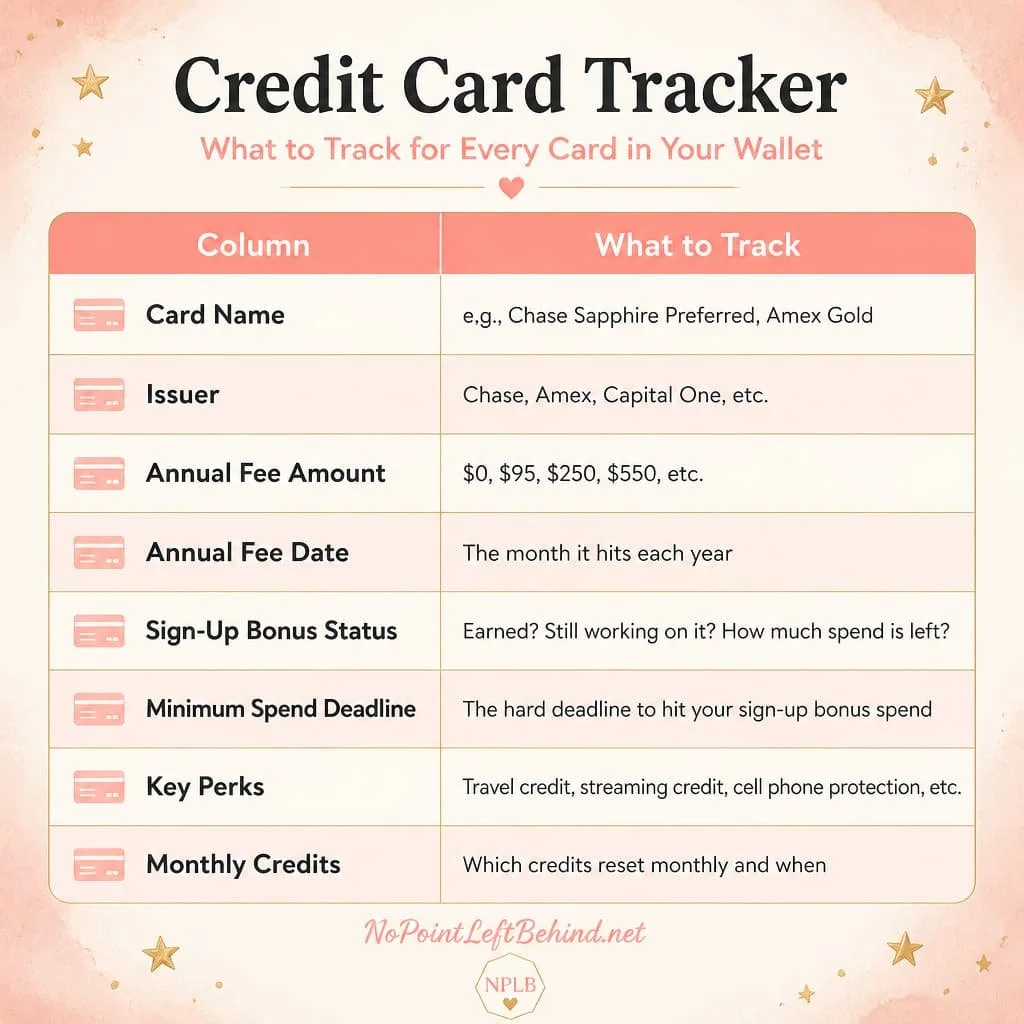
That's it. Eight columns. One row per card. Update it whenever something changes. Simple, effective, free.
Calendar Reminders That Save You Money
Your phone's calendar is one of the most powerful travel hacking tools you already own. Here's what to set reminders for:
Annual fee evaluation dates: Set a reminder 1 month before each annual fee hits. That gives you time to decide whether to keep or cancel — and to call for a retention offer if you're on the fence. (That's your Day 6 playbook.)
Minimum spend deadlines: Set a reminder at the halfway point AND one week before the deadline. Two checkpoints so you never get caught off guard.
Monthly credit reminders: Set a recurring reminder on the 1st of each month: "Use streaming credit on [X card]. Use dining credit on [Y card]." This takes 30 seconds to set up and saves you from wasting credits all year.
Free night certificate expiration dates: These are "use it or lose it" — don't let them expire.
Quarterly bonus category activation dates: Set a reminder at the start of each quarter (January, April, July, October) to activate any rotating categories.
Julie's Tip
When I was using the spreadsheet-and-calendar method, I spent about 15 minutes at the beginning of each month reviewing my spreadsheet and making sure my calendar was up to date. That tiny investment of time kept everything running smoothly. It's not glamorous, but it works.
Your Credit Card Issuer Apps — Don't Sleep on These
Here's something people overlook: you probably already have some of the best tracking tools on your phone. The apps from your card issuers are more powerful than most people realize.
Chase app: Check your Ultimate Rewards balance, see available Chase Offers (these are basically free money on purchases you're already making), manage payment due dates, and track spending by category.
Amex app: Check your Membership Rewards balance, activate Amex Offers, track statement credits, and see which benefits you've used this year.
Capital One app: Check your miles balance, see real-time purchase notifications, and manage your rewards.
Every issuer app also lets you set up autopay, check statements, and dispute charges if something looks wrong.
Don't Miss This
Make sure you're checking the "Offers" section in your issuer apps regularly. Card issuers constantly run targeted promotions — "spend $50 at Home Depot, get $10 back" or "spend $75 at a restaurant, get $15 back." It's basically free money. But you have to activate them first. I check mine every week and almost always find something useful.
Here's the truth about organization: it's not glamorous. But it's what separates the people who travel free from the people who almost travel free.
Every strategy in this series — the stacking pairs, the transferable points, the sign-up bonuses, the perks audit — all of it only works if you actually execute it. And you can only execute it consistently with a system that keeps you on track.
You don't need to do everything I outlined today all at once. Pick one thing. Download CardPointers, or open a Google Sheet, or set three calendar reminders for your most important deadlines. Just one thing. That's enough to start.
Because here's what I know after 20+ years of doing this: the people who build real, lasting free travel aren't the ones with the most cards or the most points. They're the ones who show up consistently — month after month — and make sure nothing slips through the cracks.
You've been showing up for 13 days straight. That already puts you ahead of 99% of people who ever think about doing this.
🎉 Tomorrow Is Day 14 — And It's the Finale
We've covered a lot of ground together over these 13 days. You know how to build a stack, earn points strategically, transfer them, book free flights and hotels, stack for your whole family, maximize every perk, and now — keep it all organized.
Tomorrow, we bring it all together.
Day 14 is your 90-Day Plan — a clear, step-by-step roadmap for exactly what to do in your first 30, 60, and 90 days of travel hacking. No overwhelm. No guessing. Just a simple action plan you can follow from the moment you finish this series.
This is the post I wish someone had handed me when I started. I'll see you there.
👉 [Read Day 14 — Your 90-Day Travel Hacking Plan →]
