⭐ My 20+ Years Using Rakuten (and What I’ve Learned)
I’ve used Rakuten for over 20 years, and one thing I’ve noticed is that tracking issues happen more often during the holidays. With all the sales, bonus events, and constant rate changes, I check my account more often than normal just to make sure everything tracked correctly.
If something doesn’t show up, don’t panic — it happens! Rakuten makes it easy peasy to submit a missing cashback claim, and during peak shopping season when the offers are stacked sky‑high, it is absolutely worth the effort. You can submit a claim right inside your account, and Rakuten usually resolves it quickly. If you need help, I have a full walkthrough here: How to Request Missing Cashback.
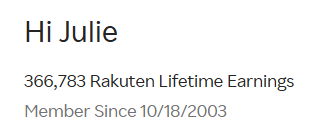
Proof that I practice what I preach — here’s my Rakuten dashboard!
⭐ The Most Common Rakuten Tracking Issues (Explained Simply)
1. You Didn’t Click Through Rakuten Last
Rakuten must be the final click before checkout.
Fix: Always click Rakuten right before you check out.
2. You Used a Coupon Code Not Listed on Rakuten
Fix: Use only Rakuten‑approved codes.
3. You Switched Devices Mid‑Purchase
Fix: Complete the entire purchase on one device.
4. You Used the Store’s App
Fix: Shop in the browser, not the store app.
5. Your Browser Blocked Cookies
Fix: Enable cookies or use a “clean” browser window.
6. You Didn’t Activate the Browser Extension
Fix: Make sure the extension is installed and active.
7. You Bought a Product Not Eligible for Cashback
Fix: Check Rakuten’s store terms before buying.
8. You Returned Part of Your Order
Fix: Split orders if you’re unsure about an item.
9. The Store Has Delayed Reporting
Fix: Wait 48–72 hours before assuming it didn’t track.
⭐ How to Fix a Rakuten Tracking Issue (Step‑by‑Step)
Rakuten makes it easy to submit a Missing Cashback Ticket.
If you want a full walkthrough with screenshots, here’s my guide: 👉 How to Request Missing Cashback
⭐ Pro Tips to Prevent Tracking Issues
✔ Always click Rakuten last
✔ Use the browser extension
✔ Avoid store apps
✔ Don’t use unlisted promo codes
✔ Keep cookies enabled
✔ Don’t switch devices
✔ Split orders
✔ Screenshot your click‑through
If you want to automate portal checking, I use TrackRak to monitor rate changes and bonus events. You can read more here: 👉 TrackRak: How I Keep Up With Portal Bonuses
⭐ Final Thoughts: Tracking Issues Are Annoying — But Fixable
Rakuten is one of the easiest ways to earn cashback or Amex points, but tracking issues happen to everyone. The good news is that once you understand why they happen, they’re easy to prevent — and even easier to fix.
If you want to go deeper into earning points without opening new cards, explore my Stack & Save Hub— it’s where I keep all my Lazy Girl earning strategies.
⭐ About the Author
Hi, I’m Julie — travel hacker, cruise‑lover, and creator of NoPointLeftBehind.net. I’ve been earning points and miles for over 20 years, and I teach beginner‑friendly strategies that don’t require opening tons of credit cards. My goal is simple: help you travel better, cheaper, and smarter… the Lazy Girl way.
Read more about me here: 👉 About the Author
If you love stacking wins like this, don’t miss my Rakuten Rewards & Stacking Strategies Hub — it’s where I keep all my Rakuten guides, troubleshooting tips, and real‑life wins.
Join my Facebook community for daily travel hacking tips + cashback fixes. Tap here to follow the page + join the group!
Facebook Page: No Point Left Behind
Travel Hacking Moms Group: Join the Group
