🎁 Hyatt Finally Made It Easy to Gift Points
This post may contain affiliate links for products I personally use and love. If you choose to shop through them, I may earn a small commission at no extra cost to you — thank you for supporting No Point Left Behind.
I am not a credit‑card affiliate. Any credit‑card links you see on my site are personal referral links for cards I personally hold and use. If you use one of my referral links, I may receive bonus points. As always, never apply for a card unless it fits your own financial goals.
If you’ve ever tried to transfer Hyatt points between accounts, you know the pain. The old PDF form. The scanning. The emailing. The waiting. The “did I type the number wrong or is Hyatt ignoring me?” spiral. I once submitted the form three times before finally emailing support like, “Hi, it’s me, the problem.”
But as of October 15, Hyatt finally fixed it. You can now gift Hyatt points online instantly — no forms, no drama, no chaos.
And yes, I used it immediately for our upcoming family ski trip.
If you’re new to my page — or you’re reading this thinking “wait… how did you book two Hyatt rooms entirely on points?” — start with my Beginner Guide to Points & Miles. It’s the Lazy Girl version: simple, calm, and built for real life. No spreadsheets, no overwhelm, just the exact system I use to earn free travel for our family every single year.
❄️ Why We Needed This: Two Rooms, Two College Boys
Our boys are now in that late‑teen/early‑20s stage where sharing a room is… not happening. So for our ski trip, we needed two rooms booked entirely on points.
Here’s how our points situation looked:
Brandon had enough Hyatt points to book Room #1
I had enough Hyatt points to book Room #2, but needed a small top‑off
We also had a Chase Sapphire Reserve sign‑up bonus hit (thanks to Brandon’s recent business trip)
And because I referred him, we have another 15K points landing any day now
So here’s the exact strategy we used.
🏔️ Step 1: Book the First Room in Brandon’s Name
We used his Hyatt points to book Room #1 under his account.
Even though the stay is free, those nights still count as elite nights for him. Hyatt is generous like that.
🏔️ Step 2: Move the Rest of His Points to Me
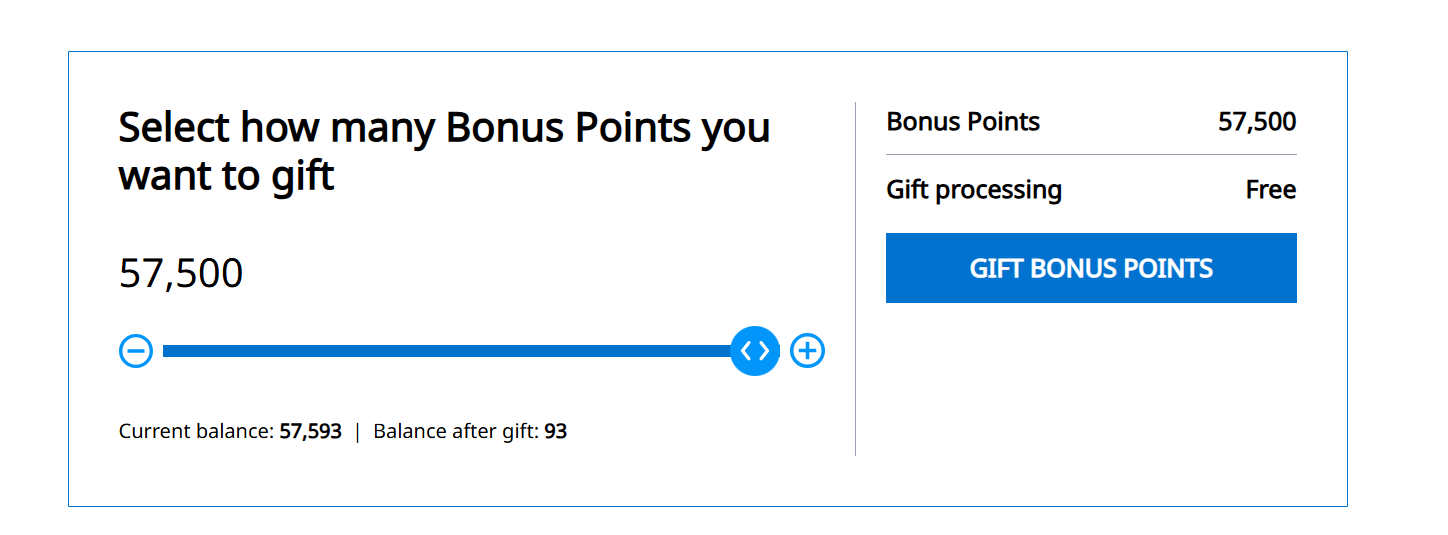
After Room #1 was booked, Brandon still had a small stash of points left — and we needed those to top off my account for Room #2.
Under the old system, this is where the dreaded PDF would come in.
But now?
Go to Loyalty
Click Redeem
Choose Gift Points
Enter your loved one’s name, account number, and email
Hit submit
Points transfer instantly
I refreshed my account and boom — the points were already there.
This is huge for people like me who cannot fill out a simple form correctly (shake head).
🏔️ Step 3: Combine His Transferred Points + My Points + The 15K Referral Bonus

Now that Brandon’s leftover points were in my account, I combined:
My existing Hyatt stash
His transferred points
The 15K referral bonus that’s hitting soon
And that gives me exactly what I need to book Room #2 under my name.
Two rooms. All on points. No forms. No chaos.
💗 Proof I Really Do Love Hyatt
I’ve booked so many Hyatt stays on points over the years — it’s my favorite hotel currency by far. You can see all of them here:
👉 My Hyatt rooms booked on points
🛍️ Lazy Girl Shopping List
A few things that make point‑booking, ski trips, and travel days easier — all items I personally use and love:
👩💻 About the Author
Julie Davis is the founder of No Point Left Behind and the creator of the Lazy Girl Series, where she teaches busy women and travel‑loving moms how to earn more rewards, travel smarter, and simplify life with tools that actually work.
She cruises 7–9 times a year, keeps every credit card strategy stored in her head (with CardPointers as her backup), and believes travel hacking should feel fun — never overwhelming.
Follow along for more Lazy Girl tips, tools, and travel inspiration — and explore her curated lists on Benable and ShopMy.
